QR Code Generator & 3D Print Studio
Create high-contrast QR codes for URLs, Wi-Fi, and vCards with custom vector SVG logos, 3D extruded typography (10 fonts), and combined Logo + Text lockups. Export ready-to-slice multi-color .3MF / .STL models with RFID cavities, magnet pockets, and countertop stands. 100% offline.
Each line generates an individual PNG file inside a ZIP archive.
100% offline — no data leaves your browser
The Complete Guide to QR Code Architecture, Reed-Solomon Error Correction & Branded Logos
Quick Response (QR) codes (standardized internationally under ISO/IEC 18004) are two-dimensional matrix symbologies capable of encoding alphanumeric strings, URLs, Wi-Fi credentials, and contact vCards into optical binary modules.
Unlike basic 1D barcodes that only store data horizontally in 10 to 20 digits, QR codes store data across both horizontal and vertical axes—encoding up to 7,089 numeric or 4,296 alphanumeric characters. The s0lve.it Custom QR Code Generator generates high-resolution vector and raster QR codes entirely inside your browser's private memory with zero tracking redirects, zero subscription expirations, and 100% offline privacy.
Reed-Solomon Error Correction Levels (ECC)
QR codes utilize advanced Reed-Solomon algebraic error correction, enabling optical scanners and smartphone cameras to reconstruct corrupted, scratched, or obscured data:
| ECC Level | Data Recovery Capacity | Module Density | Optimal Use Case |
|---|---|---|---|
| Level L (Low) | ~7% of codewords restored | Lowest density (Largest modules) | Crisp digital displays, clean indoor signage, high-density text payloads. |
| Level M (Medium) | ~15% of codewords restored | Standard balance | Default industry standard for menus, direct mail, and print marketing. |
| Level Q (Quartile) | ~25% of codewords restored | High density | Curved industrial packaging, factory floors, outdoor flyers subject to wear. |
| Level H (High) | ~30% of codewords restored | Highest density (Smallest modules) | Mandatory for Custom Logo Overlays; harsh outdoor environments. |
Anatomy of a Scannable QR Matrix
To ensure 100% scanning reliability across all smartphone camera sensors, every valid QR matrix consists of five architectural zones:
- Finder Patterns (Position Markers): The three distinct nested squares located in the top-left, top-right, and bottom-left corners that establish 360-degree orientation and scanning angle.
- Alignment Patterns: Smaller concentric squares distributed across larger QR versions that correct for lens curvature and paper warps.
- Timing Patterns: Alternating black and white module tracks connecting the finder patterns that define the matrix coordinate grid.
- Quiet Zone: A mandatory 4-module wide margin of solid background color surrounding the perimeter. Removing this quiet zone prevents scanners from detecting module edges.
Bulk & Batch 2D QR Code Generation (100% Client-Side & Private)
Generating dozens or hundreds of individual QR codes one-by-one is tedious and error-prone. The s0lve.it Bulk Batch Generator allows you to paste a list of URLs, product IDs, contact strings, or table numbers—one per line—and instantly produce a complete batch of standardized, production-ready QR codes in seconds.
- Batch Styling & Customization: Your chosen module geometry (modern rounded modules, sleek circular dots, or classic precision squares), foreground and background color palette, and custom brand logo overlay are uniformly applied across every code in the batch.
- One-Click ZIP Export: Download all generated items compiled cleanly into a single compressed
.ziparchive. Each file is automatically named after its payload slug (e.g.qr_01_table_01.png,qr_02_table_02.png). - Print & Vector Formats: Choose crisp 300 DPI raster PNG images for immediate digital deployment and offset printing, or resolution-independent vector SVG files for laser engraving, vinyl cutting, and parametric CAD sketching.
- Enterprise-Grade Offline Privacy: Unlike traditional web services that transmit your customer URLs, employee IDs, or Wi-Fi passwords to external cloud databases, our batch generator processes 100% of matrix mathematics in your local browser thread using WebAssembly and pure client-side JavaScript. No data ever leaves your device.
3D Printed QR Code Engineering: Raised vs. Flush Inlay vs. Debossed
Physical 3D printed QR plaques, signs, and keychains must be engineered for both visual aesthetics and optical scanner readability. Our integrated 3D Studio generates watertight, manifold geometry optimized for three distinct additive manufacturing workflows:
1. Raised Relief (Classic Multi-Color)
Dark QR modules are elevated above the baseplate surface (typically 0.8–1.5 mm). Ideal for multi-material printers (Bambu Lab AMS, Prusa MMU, Voron StealthBurner) or single-extruder printers using a manual filament color pause at layer height (M600).
2. Flush Inlay (Dual-Color Flat Face)
Both black QR modules and white backing are printed flush on the exact same plane. When sliced face-down on a textured PEI build plate, the resulting QR plaque is 100% flat with zero layer lines, offering a silky smooth, scratch-resistant, non-snagging finish.
3. Debossed Grooves (1-Color Paint Infill)
Engineered specifically for single-extruder 3D printers with zero filament swapping. Carves recessed channels (0.8–1.2 mm deep) into a light baseplate. After printing, flood the channels with dark acrylic paint, nail polish, or crayon, then wipe the top face clean with an alcohol wipe.
Tested & Verified: Real-World 3D Prints & Nozzle Sizing Guide
Every 3D model generated by our studio is mathematically verified for physical slicing and optical camera scannability. Below is a direct comparison between the in-browser 3D Print Studio CAD preview (with multi-material 3MF export, Reddit badge, and prop stand) and real-world physical prints produced on a standard desktop 3D printer:
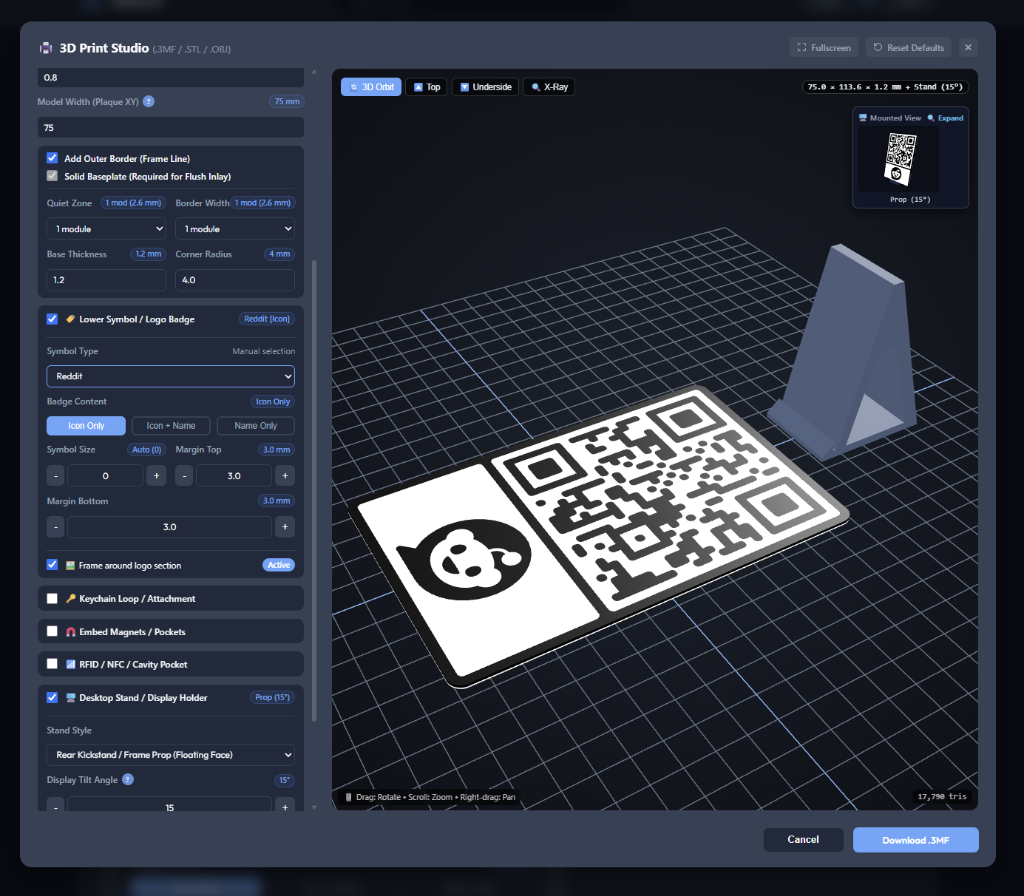
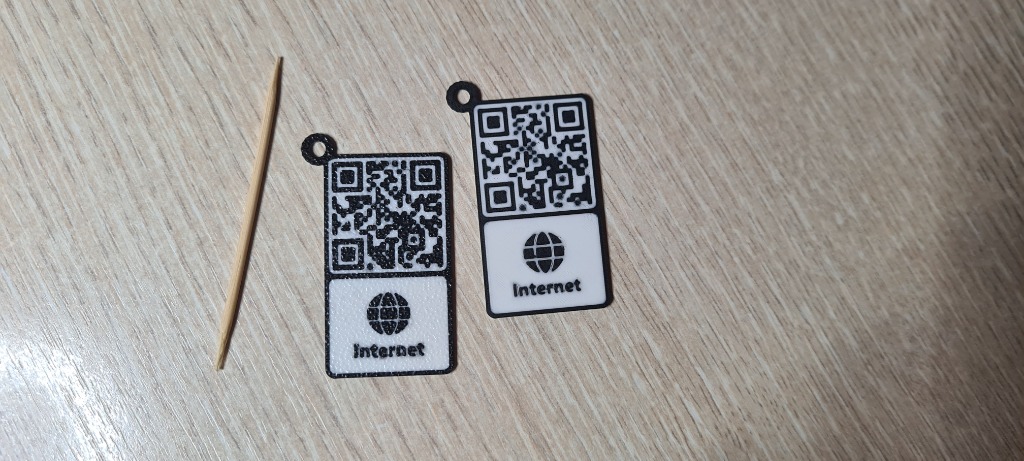
🔬 Recommended Nozzle Sizing & Tolerance Guidelines
- Micro & Keychain Sizes (25 × 25 mm): Easily printable using a standard 0.2 mm nozzle on factory slicer profiles (as shown in our verified test prints). Even at this miniature size, optical contrast on textured PEI is flawless and smartphone camera autofocus resolves the matrix in milliseconds.
- Standard 0.4 mm Nozzles (50 mm+ Recommended): For everyday desktop 3D printers running standard 0.4 mm brass or hardened steel nozzles, a model width of ≥ 50 mm is recommended to guarantee that individual module lines have enough extrusion perimeter width for reliable optical reading.
- Tuned Sub-50 mm Printing: While 50 mm is the recommended safe default, smaller models (30–45 mm) can be printed cleanly with a 0.4 mm nozzle if your printer is calibrated with tuned flow rates, pressure advance (linear advance), and a slower outer wall speed (≤ 40 mm/s).
- Production Best Practice (Test 1 First): Before mass-printing large production batches (e.g. 50+ restaurant table signs or conference tags), always slice and print one single sample piece to confirm your camera sensor reads the code effortlessly under your target ambient lighting.
Embedding Smart Hardware: RFID / NFC Chips & Neodymium Magnets
Take your QR codes into the physical-digital realm by seamlessly embedding internal NTAG213/215/216 NFC coins or neodymium disc magnets directly inside the printed baseplate.
- Enclosed (Sealed Inside) vs. Open (Underside): Choose Enclosed to permanently encapsulate hardware inside solid plastic for waterproof, tamper-proof durability. Choose Open to carve rear friction-fit pockets for easy snap-in or glue-in installation after printing.
- Real-Time Pause-at-Height Slicer Guide: The 3D Studio dynamically computes the exact slicer pause height:
Z_pause = Floor_Thickness + Hardware_Depth + Z_Fit_ToleranceIn your slicer (Bambu Studio, OrcaSlicer, PrusaSlicer), move the vertical layer preview slider to this Z height, right-click the plus icon, select Add Pause, insert the hardware when the printer halts, and resume.
- Dual-Tolerance Engine (XY & Z Headroom): Horizontal (XY) tolerance expands pocket diameters (e.g. +0.15 mm) so discs drop in smoothly. Vertical (Z) tolerance adds crucial nozzle clearance (+0.20 mm / 1 full layer) preventing the hot 3D printer nozzle from dragging across the hardware during ceiling bridging.
- Magnetic Nozzle Pro-Tip: Hardened steel nozzles can magnetically attract loose neodymium magnets out of their pockets when bridging across the cavity. To avoid collisions, add a tiny drop of cyanoacrylate (super glue) into the pocket base or use a non-magnetic brass or ruby nozzle before resuming the print.
Batch 3D Model Generation & Multi-Part .3MF Slicer Automation
When preparing production runs for restaurant table tents, trade show badges, or machine asset tags, switching to Bulk Batch Mode empowers you to export dozens of unique 3D models simultaneously. The generated .3MF file packages incorporate native negative volume definitions (slic3rpe:type="negative_volume" and subtype="negative_part" in Metadata/model_settings.config). When imported into Bambu Studio or OrcaSlicer, negative pocket volumes are automatically subtracted from the solid baseplate without requiring manual Boolean cutters or CAD work.
Direct Vector SVG Logo Extrusion: Mathematical Precision vs. Raster Tracing
Standard 3D QR generators either rasterize uploaded brand logos onto a 2D canvas or rely on lossy bitmap auto-tracers. This creates jagged stair-stepped perimeter walls, loose floating micro-polygons, and non-manifold holes that trigger non-planar mesh errors in slicers like Bambu Studio and PrusaSlicer.
The s0lve.it Custom Vector Engine bypasses rasterization entirely. It parses raw SVG XML directly—evaluating cubic and quadratic Bézier segments, circular arcs, matrix transformations, and group coordinates into exact floating-point paths:
📐 Direct Bézier Spline Discretization
Bézier curves are mathematically subdivided based on chord tolerance rather than screen pixels. This produces buttery-smooth organic curves and sharp acute corners in 3D prints, preserving brand typography down to 0.1 mm precision.
🕳️ Topological Clipper PolyTree Hierarchy
Nested holes and interior cutouts (such as the centers of letters "O", "A", or "P") are categorized using non-zero and even-odd polygon winding. Outers and holes are paired cleanly so slicers slice solid islands with hollow voids with 0 non-manifold warnings.
🎨 3D Multi-Material Relief Integration
Extrudes seamlessly across all 3 relief modes: elevated in Raised mode, co-planar in Flush Inlay mode for smooth face-down PEI printing, or carved into the base in Debossed mode for acrylic paint infill.
🛡️ Clean Figma & Vector Mask Filtering
Automatically detects and filters out technical <defs>, <mask>, and <clipPath> bounding boxes from Figma, Illustrator, or Sketch, preventing black slabs and preserving pure foreground geometry.
True 3D Vector Typography: 10 Curated Fonts & Diacritics Support
Instead of relying on basic browser canvas rasterization, our 3D Typography Engine utilizes local TrueType font parsing powered by opentype.js. Glyph outlines are read directly from font tables into watertight 3D polygonal boundaries, producing crisp architectural signage and call-to-actions ("SCAN FOR MENU", "GUEST WI-FI", "PAY HERE"):
| Font Style | Typeface Family | Design Profile | Recommended Print Application |
|---|---|---|---|
| Modern Bold Sans | Archivo Black | Ultra-thick, high-contrast grotesque sans | Universal default: maximum legibility on 0.4 mm nozzles. |
| Impact Display | Bebas Neue | Condensed vertical display capitals | Long titles and multi-word names where width is constrained. |
| Ultra-Thick Block | Anton | Extra-bold heavyweight poster sans | Heavy industrial signage, machinery tags, high durability signs. |
| Classic Luxury | Cinzel | Classical Roman inscriptional serif | High-end hotels, wine lists, jewelry stores, executive desks. |
| Tech Monospace | Space Mono | Fixed-width geometric developer mono | IP addresses, crypto public keys, server rack badges. |
| Friendly Rounded | Righteous | Smooth deco rounded terminal curves | Keychains and pocket tags (non-snagging, skin-friendly corners). |
| Cyber Sci-Fi | Orbitron | Futuristic octagonal geometric lettering | Gaming conventions, electronics makers, tech workspaces. |
| Military Stencil | Black Ops One | Heavy bridged military cargo stencil | Toolboxes, rugged flight cases, tactical inventory labeling. |
| Chunky Cartoon | Fredoka | Soft, friendly plump geometric sans | Kids' activities, pet tags, casual coffee shops, bakeries. |
| Vintage Script | Lobster | Connected retro sign-painter brush script | Artisan boutiques, craft breweries, wedding guest plaques. |
🇪🇪 Full International Diacritics Support: All 10 font packages include full UTF-8 character mapping for Estonian and Nordic alphabets (Õ, Ä, Ö, Ü, Š, Ž), German umlauts, French accents, numerals, and punctuation. Glyphs are extruded as solid, manifold 3D bodies that slice with zero missing accents.
Combined "Logo + Text ✨" Composite Lockup & Optical Balancing
When building branded signage, showcasing just a logo or just text is often not enough. The Logo + Text ✨ mode combines both your company mark and a supporting call-to-action into a unified vector lockup, available in two primary arrangements:
- Side-by-Side ↔ (Horizontal Lockup): Positions the brand mark on the left and the banner text on the right, vertically centered. Ideal for elongated landscape plaques, desk nameplates, and wide conference badges.
- Stacked ↕ (Vertical Lockup): Centers the brand mark directly above the banner text. Ideal for upright countertop stands, cafe table tents, and square keychain free-bands.
⚖️ Smart Width-Aware Balancing & Real-Time Relative Size Slider
A common problem in composite graphic lockups is that wide logos (e.g. logos with aspect ratios exceeding 1.5) force standard square bounding boxes to shrink accompanying text into an unreadable speck. Our engine solves this with smart width-aware optical compensation:
In addition to automatic optical balancing, you have full creative control with the Text Relative Size slider (40% to 220%) and step buttons. Adjusting the slider scales the text in real time, with instant visual feedback in both the 2D canvas and the 3D WebGL studio.
Modular Desktop Display Stands: 4 Ergonomic Orientable Styles & Tilt Tuning
Physical QR signs need stable, elegant presentation on countertops, point-of-sale desks, and cafe tables. Rather than requiring external acrylic hardware, our studio generates 4 distinct standalone 3D printable stands engineered with 2-manifold orientable geometry:
1. Magnetic Post (Pedestal)
Floating minimalist pedestal stand. Features optional hidden magnet pockets to magnetically snap and secure the plaque in place for easy detachment.
2. Curved Countertop Pill
Wide, rounded elliptical base with low center of gravity. Maximum tip-over stability for high-traffic restaurant tables and retail counters.
3. Corner Clip-on Feet
Dual snap-on friction clips that attach directly onto the bottom corners of the plaque. Extremely lightweight and fast to print with minimal filament.
4. Rear Kickstand / Prop
Discreet angled kickstand that slots into the rear of the plaque, leaving the front face completely unobstructed for a sleek picture-frame aesthetic.
Viewing Ergonomics, Tolerances & Mounted 3D Preview: Adjust the Display Tilt Angle from 5° to 35° (10° for eye-level wall counters, 15° for standard countertops, 25°–35° for low coffee tables). The Slot Fit Clearance (+0.20 mm to +0.50 mm) ensures your plaque slides into the stand slot smoothly without binding or requiring force. Click the floating 🖥️ Mounted View thumbnail in the viewport to open a full-screen interactive 3D inspection modal where you can rotate the assembled display 360° before printing. In multi-color .3MF or multi-body .OBJ exports, the stand prints flat on your build plate alongside the plaque as an independent body with 0 open edges.
Professional On-Demand 3D Printing & Worldwide Fulfillment by VärvX OÜ
Don't own a multi-color 3D printer or lack the time to calibrate slicer tolerances? You can now order custom, ready-to-display 3D QR plaques produced with industrial precision and shipped straight to your doorstep. Every order is fulfilled by our European manufacturing workshop, VärvX OÜ (Estonia, EU), adhering to boutique "Quality Over Quantity" standards.
💎 Premium Filament Palette
Manufactured with genuine Bambu Lab engineering filaments (PLA Basic, PLA Matte, Silk, and Galaxy) or high-durability PETG for outdoor weather and UV resistance. Custom Pantone/brand color matching is available upon request.
🔬 Zero-Failure Optical Scannability
Every finished plaque undergoes a strict physical optical scan test across iOS and Android camera sensors before packaging. Solid 100% top surface density prevents internal light bleeding or contrast loss.
🏢 Tiered Commercial Discounts
Equipping a restaurant chain, hotel, bar, or corporate conference? Benefit from progressive volume discounts ranging from -10% (3+ units) up to -60% (50+ units) with full batch serialization.
📦 Worldwide Tracked Dispatch
Dispatched directly from Estonia (European Union) to over 120+ countries worldwide via DHL Express, Omniva, and international courier networks with full tracking.
Frequently Asked Questions (FAQ)
Can I order physical 3D printed QR plaques if I don't own a 3D printer?
Yes! You can configure your custom design in our 3D Studio, click the "Order Physical 3D Print" button, select your required quantity, filament preferences, and destination country, and submit an instant quote request. Our fulfillment partner, VärvX OÜ (Estonia, EU), will review your CAD specs and provide a confirmed quote with exact tracked shipping options.
What filaments, colors, and branding options are available for physical 3D print orders?
We print using industrial multi-material printers with Bambu Lab PLA Basic, PLA Matte, Silk, and Galaxy filaments, as well as outdoor UV-resistant PETG. You can specify custom color tones, contrasting accent trims, and even upload custom vector logos or text banners. Every physical piece is printed with solid top layers and smooth PEI bed texturing for a premium, retail-grade matte aesthetic.
Do you offer volume discounts for restaurants, hotels, and events?
Yes, we offer substantial volume discounts: -10% for 3+ units, -20% for 5+ units, -35% for 10+ units, -50% for 25+ units, and -60% for 50+ units. Discounts are calculated automatically in the quote estimator. You can also generate variable batch QR codes (e.g. individual table numbers 1 to 50 or separate Wi-Fi access codes) within the same commercial order.
How do I 3D print a QR code in Bambu Studio, OrcaSlicer, PrusaSlicer, or Autodesk Fusion 360?
Click either the "3D Print Export (.3MF / .STL / .OBJ)" or "CAD SVG" button. For multi-color printing on Bambu Lab AMS or Prusa MMU, select .3MF (Color)—it exports a true multi-part assembly with distinct Baseplate and QR_Code components mapped to your chosen filament colors with zero manual slicing segmentation. For single-extruder printers, choose .STL (Mesh) to download an immediate, water-tight binary 3D mesh with customizable relief height, size, and an optional solid baseplate with rounded corners. For 3D modeling in Blender, CAD, or slicers, choose .OBJ (.zip / CAD)—multi-body models download as a clean ZIP package containing separate aligned .obj files (Baseplate + Code) with 0 open edges, allowing you to drag both into your slicer at once and select "Load as single object with multiple parts". If you prefer parametric CAD sketching, CAD SVG unites all dark modules into a single contiguous vector path with no background blocking slab.
Can I upload my company's custom SVG logo or brand icon for 3D extrusion?
Yes. Our engine parses raw SVG vector paths mathematically directly in your browser, extracting exact Bézier curves, straight lines, and internal hole loops without rasterizing to a canvas. This guarantees razor-sharp 3D extrusion with zero jagged edges, perfectly watertight manifold walls, and zero slicer warnings. For raster images (PNG, JPG, WebP), an integrated client-side vectorizer converts solid silhouettes automatically into clean 3D polygons.
How does 3D vector text generation work, and are international characters (Õ, Ä, Ö, Ü) supported?
Text banners are converted into 3D geometry using client-side OpenType vector glyph extraction. We include 10 curated local font styles ranging from ultra-thick industrial blocks to elegant serifs and retro scripts. The engine includes complete Unicode diacritics support for Estonian (Õ, Ä, Ö, Ü, Š, Ž), Nordic, and European alphabets, ensuring special characters and accents extrude as solid manifold geometry without missing diacritics.
Can I combine both my brand logo and a custom text label on the same 3D plaque?
Yes, choose the "Logo + Text ✨" badge mode. You can arrange them Side-by-Side ↔ (horizontal) or Stacked ↕ (vertical). Our smart width-balancing algorithm automatically scales text against wide logos, and the Text Relative Size slider (40% to 220%) allows you to fine-tune the exact visual proportions in real time directly inside the 3D WebGL viewport.
How do the 4 desktop display stand styles differ, and how do they print?
The studio includes 4 standalone display stands: Magnetic Post (floating pedestal), Curved Countertop Pill (wide & stable), Corner Clip-on Feet (dual snap clips), and Rear Kickstand / Prop. Each stand is engineered with orientable 2-manifold hollow geometry and exports as a separate independent body alongside the plaque. You can adjust the tilt angle from 5° to 35° and customize the slot clearance tolerance (+0.20 mm to +0.50 mm) for a perfect drop-in fit.
What is the difference between Raised, Flush Inlay, and Debossed 3D QR codes?
Raised mode elevates dark QR modules above the baseplate—ideal for multi-material printers or manual filament swaps at layer height. Flush Inlay embeds modules flush within the baseplate face; when printed face-down on a textured PEI plate, it yields an ultra-smooth, zero-layer-line, non-snagging plaque. Debossed (Recessed) carves recessed grooves into a solid baseplate, allowing single-color 3D printer owners to fill the grooves with acrylic paint, wax crayon, or resin for crisp optical contrast.
How do I 3D print a QR code with an embedded NFC or RFID chip?
Enable the RFID / NFC / Cavity Pocket toggle in the 3D Studio and choose Enclosed (Sealed inside). The tool automatically calculates the exact Pause-at-Height (Z = Floor + Tag Depth + Z-Tolerance) and exports a multi-part .3MF package with native negative volumes. In your slicer, right-click the layer slider at the specified Z height and add a Pause. When the printer pauses, drop in your NFC coin or sticker tag, and resume printing to permanently encapsulate it.
How do I embed neodymium magnets inside a 3D printed QR code without the nozzle pulling them out?
Select Embed Magnets and choose either Enclosed (Sealed inside) or Open (Underside press-fit). For enclosed pockets, add a slicer pause at the indicated Z height. Because magnetic steel nozzles can attract loose neodymium magnets during bridging, place a small drop of cyanoacrylate (super glue) into the pocket or use a non-magnetic brass nozzle before resuming the print. Our engine also adds vertical Z-tolerance clearance to prevent the nozzle from scraping the magnet top.
How do I generate and export QR codes in bulk without uploading private data to cloud servers?
Switch to Bulk Batch Mode on our generator, then paste a list of URLs or text strings (one per line) or import a plain text file. Customize your module shapes, brand colors, and logo overlay—our client-side engine renders all QR codes simultaneously in your browser memory and packages them into a single clean ZIP archive containing high-resolution 300 DPI PNGs or scalable vector SVGs. No data ever leaves your device.
Can I batch export 3D printable QR codes for employee badges or inventory asset tags?
Yes. When you generate a list of items in Bulk Batch Mode and open the 3D Studio, you can preview each 3D item individually using the viewport navigation arrows. Clicking Download .3MF (Batch ZIP), .STL, or .OBJ compiles the entire collection into a single organized ZIP archive of uniquely named 3D model files ready for mass slicer production.
How do I paint or color a debossed (inset) QR code on a single-color 3D printer?
Select Debossed (Recessed) relief mode and 3D print the plaque in a light-colored filament (e.g. white). Use black acrylic hobby paint, a paint pen, or dark wax crayon to fill the recessed grooves generously. Before the paint fully cures, gently wipe the raised top face with a damp lint-free cloth or isopropyl alcohol wipe. The paint stays trapped inside the recessed grooves while the top face remains clean and bright, producing flawless contrast for smartphone cameras.
What layer height and nozzle size are recommended for 3D printed QR codes?
For standard 0.4 mm nozzles: A plaque width of 50 mm and larger with a 0.20 mm layer height works reliably out of the box with zero fine-tuning. Sub-50 mm models can be printed if flow and pressure advance are tuned.
For ultra-compact keychains (down to 25 × 25 mm): A 0.2 mm nozzle with a 0.10 mm layer height yields razor-sharp results that scan instantly on modern smartphones, as demonstrated in our verified test prints. For high optical contrast, print face-down in Flush Inlay mode on a textured PEI plate. Always print 1 test piece before mass production.
Does placing a logo in the center break the QR code's scannability?
No, provided the Error Correction Level is set to Level H (30%). When a logo covers up to 20–25% of the center area, Reed-Solomon error correction algorithms mathematically reconstruct the obscured data bits without scanning failure.
What is the difference between static and dynamic QR codes?
Static QR codes encode the destination payload directly into the matrix modules and work permanently forever without subscriptions or server dependencies. Dynamic QR codes route through third-party tracking URLs that break if the provider ceases operations or charges subscription fees.
What is the minimum recommended print size for a physical QR code?
For close-range scanning (e.g. restaurant tables or business cards), the minimum recommended size is 2 × 2 cm (0.8 × 0.8 inches). For billboards or posters, follow the 10:1 scanning ratio: distance to viewer divided by 10 (e.g. a 2-meter scanning distance requires a 20 cm wide QR code).
What image format is best when uploading a brand logo?
Vector SVG files (.svg) provide the highest visual and 3D precision because our engine extracts true mathematical Bézier curves without pixelation. For raster images (PNG, JPG, WebP), high-contrast square graphics with transparent backgrounds produce clean silhouettes.
Why is high color contrast important between foreground and background?
Camera sensors rely on luminance differentials to distinguish binary 1s and 0s. Always ensure dark foreground modules are placed against a light, high-contrast background (such as dark navy on white). Inverted low-contrast schemes (like light grey on white) will fail to scan.
Are the 3D desktop stands exported as a separate part or fused to the QR plaque?
The stand is exported as a completely independent, separate 3D body. In .3MF multi-material exports, the stand is placed side-by-side on the build plate with its own dedicated filament color. In .STL exports, both the plaque and stand are separate watertight volumes. All 4 stand styles (Magnetic Post, Curved Pill, Snap Feet, Prop) are built with orientable 2-manifold hollow geometry, allowing you to slice them flat on the bed or on their side without slicers filling in the filament-saving chamber.
Are my custom generated QR codes private and offline-capable?
Yes. The entire QR rendering engine runs 100% locally in your web browser. No encoded URLs, contact vCards, Wi-Fi passwords, or uploaded logos are ever transmitted to any remote cloud servers.
Explore our complete collection of client-side developer and design tools in the Tools Directory →